8 AI Search Fixes for Ecommerce Category Pages Today
By Joe Della Mora, Founder, GroundScore
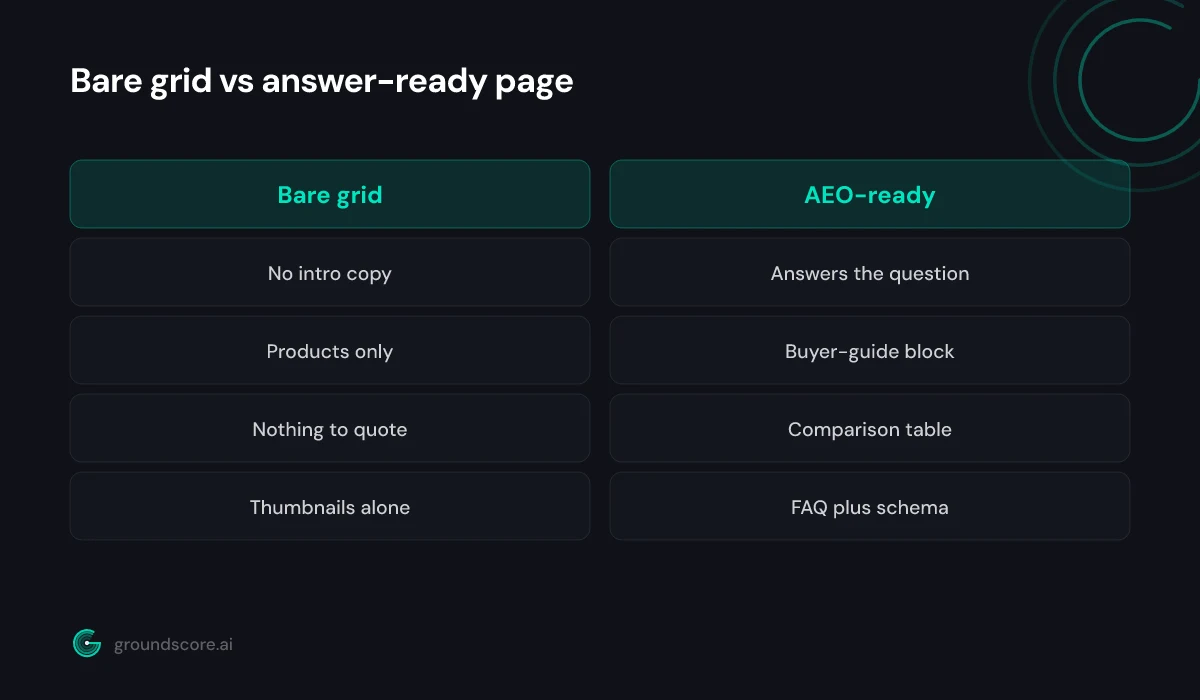
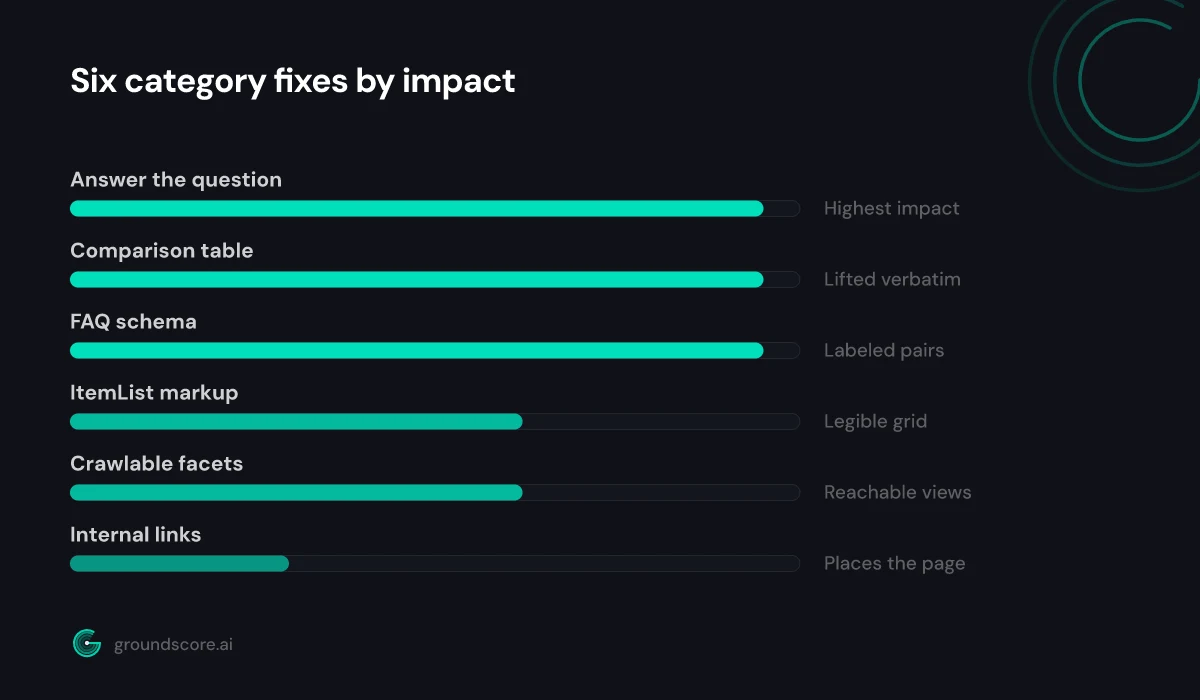
Category pages are where a lot of ecommerce AI search visibility is won or lost, and most of them are built to display products, not to answer questions. When a shopper asks an engine "what should I look for in a standing desk" or "best beginner running shoes," the engine wants a page that answers the buying question in words, backed by structure it can lift. A bare grid of products gives it nothing. This post covers eight concrete fixes for category pages specifically, not individual product pages, grouped into four moves you can make this week. Each fix is numbered so you can work through them in order. Here are the eight, from intro copy through schema, crawlable facets, and internal links.
Answer the buying question in your intro copy
Direct answer: Category pages usually open with a headline and a grid of products, which gives an engine nothing to quote. The two fastest fixes are a short intro paragraph that answers the buying question directly and a buyer-guide block that explains how to choose within the category.
1. Add intro copy that answers the buying question. Above or below the product grid, write two to four sentences that answer what a shopper in this category is actually deciding. For a "trail running shoes" category, that means naming what separates a good trail shoe from a road shoe in plain language. This is the passage an engine lifts when someone asks the question, and right now most category pages do not contain it at all.
2. Add a short buyer-guide block. Below the intro, add a compact "how to choose" section: the two or three factors that matter most, and how to weigh them. Keep it genuinely useful rather than keyword-padded. A shopper deciding between options is exactly the intent an engine is trying to satisfy, and a category page that helps them decide becomes the citable source instead of a competitor's blog post.
The instinct to fear this copy as clutter is worth resisting. You can place the intro above the grid where it frames the page, or below it where it does not interrupt the shopping flow, and either works for engines as long as the text is real HTML a fetcher can read. What does not work is hiding the copy behind a "read more" toggle that only expands with JavaScript, because many AI crawlers never trigger it. Write the answer once, keep it visible in the markup, and it earns its place by pulling in the exact queries your product grid alone can never match.
Building GroundScore, the pattern I keep seeing on ecommerce sites is category pages that rank fine in Google on the category keyword yet never surface in an AI answer, because there is no sentence on the page that actually answers a question. The grid ranks; the silence loses the citation.
If you are not sure which of your pages have this gap, a free AI visibility check will show you where engines already find you and where they go quiet.
Add structure engines can lift
Direct answer: Prose alone rarely gets quoted for a category. Two structural additions do the heavy lifting: a comparison table that contrasts the main options or subtypes in the category, and an FAQ section with FAQPage schema answering the questions shoppers actually ask before they buy.
3. Add a comparison table. Most categories contain natural subtypes worth contrasting: cushioned versus minimalist, entry-level versus pro, cotton versus synthetic. A table that lays those out is exactly what an engine reaches for when a shopper asks which type suits them. Keep the columns to the dimensions buyers weigh:
| Subtype | Best for | Trade-off |
|---|---|---|
| Entry level | First-time buyers | Fewer features |
| Mid range | Most shoppers | Higher price |
| Premium | Heavy or pro use | Overkill for casual |
| Budget | Tight budgets | Shorter lifespan |
4. Add an FAQ section with FAQPage schema. Collect the real questions shoppers ask before buying in this category, sizing, care, compatibility, returns, and answer each in 40 to 60 self-contained words. Then mark the section up with FAQPage schema so engines get clean, labeled question-and-answer pairs. The step-by-step is in how to add FAQ schema AI engines can actually use; the one rule that matters most is keeping the schema answers identical to the visible text.
One caution on the table: build it from the subtypes that genuinely exist in your catalog, not invented distinctions padded for length. An engine that lifts your comparison is vouching for it, and a table describing options you do not actually stock reads as thin and gets discounted. The same goes for the FAQ, answer questions shoppers really ask, sourced from your support tickets and site-search logs, rather than questions reverse-engineered from keywords. Real questions with honest answers are what get quoted; manufactured ones are noise an engine learns to skip.
Mark up the listing itself
Direct answer: The product grid is data an engine can use if you describe it. Add ItemList schema so the listing reads as an ordered set of named products, and expose review signals like aggregate ratings in text and markup so the page carries the corroboration engines weigh before recommending.
5. Add ItemList markup to the grid. A category page is, structurally, an ordered list of products, and ItemList schema tells engines exactly that: here are the items, in this order, each with a name and a link. Without it, a fetcher sees a wall of thumbnails and guesses. With it, the listing becomes machine-readable data the engine can reason about when a shopper asks what is in the category.
6. Surface review signals in text and markup. Engines weigh corroboration heavily before recommending anything to a shopper. If your products carry ratings, expose the aggregate signal on the category page in words a fetcher can read, "rated 4.6 across 1,200 reviews," not only as a star graphic. Keep any rating markup honest and matched to what shoppers see. The broader set of types worth using is covered in 9 schema types that matter most for AI search visibility.
These two fixes turn your listing from decoration into structured evidence. This is distinct from optimizing individual product pages, which is its own project; here the goal is making the category-level listing legible and trustworthy.
Ecommerce platforms vary in how much of this they emit by default. Some generate ItemList and rating markup automatically; others output none, or output it in a shape engines parse poorly. Do not assume your theme handles it, view the page source or run the URL through a validator and confirm the markup is actually present and well-formed. Where your platform will not emit clean structured data, a small template change or an app that injects JSON-LD is usually enough, and it is worth doing once because every category page on the site inherits the fix.
Keep the page crawlable and connected
Direct answer: A category page only earns citations if engines can reach it and understand where it sits. Make faceted and filtered versions crawlable rather than trapped behind JavaScript or blocked parameters, and add internal links that connect the category to its parent, its subcategories, and related buyer-guide content.
7. Make filter and facet pages crawlable. Faceted navigation is a common invisibility trap. Useful filtered views, "waterproof hiking boots," "under 100 dollars", often live behind JavaScript-only interactions or URL parameters blocked in robots.txt, so an engine never sees the exact page that would answer a specific query. Where a filtered view maps to real buyer intent, make it a crawlable, server-rendered URL with its own answerable intro. Where it does not, keep it out of the index deliberately rather than by accident.
8. Add internal links that place the category. Engines use internal links to understand structure and authority. Link each category up to its parent, down to its subcategories, and across to any buyer guide or comparison content you have on the topic. This connects the page into a topic cluster and signals that it is a considered part of your site, not an orphan. For the reasoning behind that, see what is AI search visibility.
A quick way to find the crawlability trap is to fetch a filtered category URL the way an engine would, without running JavaScript, and see whether the products still appear. If the page comes back empty until scripts execute, the filtered view is invisible to fetchers that do not run them, and that describes a large share of AI crawlers today. Decide deliberately which faceted views deserve to be indexed as their own answerable pages and which should be kept out with canonical tags or robots rules, rather than letting the choice be made by accident.
Frequently asked questions
Why do ecommerce category pages struggle in AI search?
Because they are built to display products, not answer questions. A grid of thumbnails gives a retrieval engine nothing quotable, so even a category page that ranks well in Google stays absent from AI answers. Adding a direct answer, a buyer guide, tables, and schema turns the page into a source engines can actually cite.
Should I optimize category pages or product pages first?
Category pages tend to match the higher-level "what should I look for" and "best type of X" questions shoppers ask engines, while product pages match specific-item queries. If your goal is being cited in discovery and comparison answers, category pages are the faster win. Individual product pages are a separate, complementary project worth doing next.
What is ItemList schema and why does it help category pages?
ItemList schema describes an ordered list of items, which is exactly what a category page is. It tells engines the page contains these named products in this order, each with a link, instead of leaving a fetcher to guess from thumbnails. That makes your listing machine-readable data an engine can reason about when answering category questions.
Do faceted filter pages help or hurt AI visibility?
Both, depending on control. Filtered views that map to real buyer intent, like "waterproof hiking boots," are valuable if they are crawlable, server-rendered URLs with answerable copy. The same facets hurt when they are trapped behind JavaScript, blocked by parameters, or generating thousands of thin duplicate pages. Make the useful ones reachable and keep the rest out deliberately.
How do I know if these fixes are working?
Re-ask engines the category questions your shoppers use and log whether your pages get named, remembering that answers vary run to run, so sample repeatedly rather than trusting one check. Watching your score move across the three pillars over a few weeks tells you more than any single answer about whether the changes are landing.
Do I need every one of the eight fixes?
Not always, but they reinforce each other. The intro answer and comparison table do the most to earn a citation, while crawlable facets and internal links make sure the page can be reached and understood in the first place. Start with the ones your pages are missing most, confirmed by a check, rather than assuming which gap is yours.
The bottom line
Ecommerce category pages carry a lot of buying-intent traffic and almost none of the structure AI engines need to cite them. These eight fixes, answer the buying question, add a buyer guide, a comparison table, and FAQ schema, mark up the listing with ItemList and review signals, and keep facets crawlable and linked, turn a product grid into a page engines can quote. None of them require a redesign, and most can ship this week.
See which of your category pages engines already find and which they skip. Run a free AI visibility check and start from data instead of guesswork.
How visible is your site in AI search?
Check your AI visibility score in seconds. Free, no account needed.
Check your score