How to Add FAQ Schema That AI Engines Can Actually Use
By Joe Della Mora, Founder, GroundScore
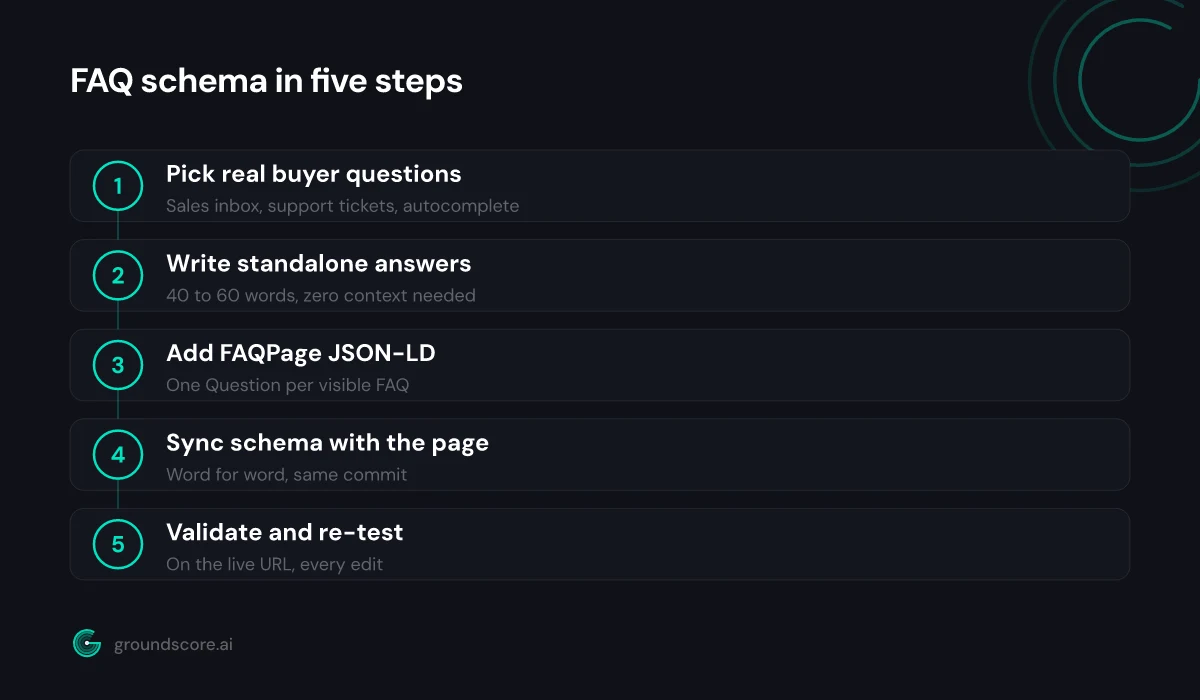
FAQ schema is the most direct way to hand AI engines your questions and answers in a format they cannot misread. Done right, it turns a page's FAQ section into machine-readable pairs that ChatGPT, Claude, and Perplexity can parse, quote, and attribute. Done wrong, it is markup describing content that is not there, and it helps nobody. Most guides stop at pasting JSON-LD into a template. This one covers the part that actually decides whether the markup earns citations: choosing questions buyers really ask, writing answers that survive being lifted out of context, and keeping schema and visible copy in sync as pages change. You need edit access to your page HTML or a CMS that supports custom markup, roughly one to two hours for the first page, and no coding skill beyond careful copy and paste. Here are the five steps, in order.
Step 1: Pick real questions your buyers actually ask
Direct answer: Start with questions real buyers type into ChatGPT or Perplexity, not questions you wish they asked. Pull them from sales emails, support tickets, and the People Also Ask boxes on Google. Pick five to eight questions per page, each one specific enough that a forty-word answer can fully resolve it.
The quality of your FAQ schema is decided before you write a line of markup. If the questions are wrong, nothing downstream matters, because AI engines surface answers to the questions users actually ask, phrased roughly the way users ask them.
Good sources for real questions:
- Sales and support inboxes. The questions people ask before they buy are the questions other people are asking an AI engine right now.
- Search suggestions. Type your topic into Google or Perplexity and note what autocomplete offers.
- Your own answer history. Anything you have explained three times by email belongs on a page.
Building GroundScore, the pattern I keep seeing when we scan sites is an FAQ section written from the company's point of view: "What makes you different?" and "Do you offer consultations?" Those are questions nobody types into an AI engine. The buyer asks "how much does a kitchen remodel cost" and "how long does it take." Write for the buyer's phrasing, not your own.
One more filter before the list is final: keep only questions with stable answers. Anything that changes weekly, like current promotions or availability, will drift out of sync with your markup and create exactly the mismatch problems covered in step 4. Evergreen questions with durable answers are the ones worth marking up.
Keep each page to one topic cluster. A page that answers plumbing questions and hiring questions at the same time gives engines a muddled signal about what the page is for. If your list of questions splits into two themes, split it into two pages.
Step 2: Write standalone answers of 40 to 60 words
Direct answer: Write each answer as a self-contained paragraph of 40 to 60 words that makes sense with zero surrounding context. Name the subject instead of saying "it," lead with the conclusion, and cut warm-up phrases. If an AI engine lifted the paragraph verbatim into an answer, it should read complete.
This is the step most FAQ sections fail. Answers written for a human skimming your page lean on context: "Yes, we do!" works under a heading but is meaningless as an extracted passage. AI engines pull passages, not pages, so every answer has to carry its own context.
The standalone test is simple: cover the question with your hand and read only the answer. Can a stranger tell what is being discussed, and is the question resolved? If not, rewrite.
| Weak answer | Standalone answer |
|---|---|
| Starts with "It depends" or "Great question" | Leads with the conclusion |
| Refers to "it," "this," or "we" without names | Names the subject and the company |
| Runs 150 words with hedging | Makes one point in 40 to 60 words |
| Pitches instead of answering | Answers first, sells nowhere |
Use the question itself as a visible heading on the page, phrased the way the buyer asks it. That gives the answer paragraph an anchor, keeps the page skimmable for humans, and makes the markup step mechanical: every heading becomes a name field, every paragraph under it becomes an acceptedAnswer.
The 40 to 60 word range is not arbitrary. Shorter answers tend to skip the substance that makes a passage worth quoting. Longer answers bury the point and force an engine to summarize you, which is where nuance and attribution get lost. One question, one conclusion, one supporting detail: that is the shape that gets quoted intact.
Step 3: Add the FAQPage JSON-LD markup
Direct answer: Add a script tag of type application/ld+json to the page containing a FAQPage object with one Question and acceptedAnswer pair per visible FAQ. Place it anywhere in the head or body, keep the answer text identical to what is rendered on the page, and use plain text inside the JSON.
JSON-LD is the format to use. It lives in a single script block, never touches your visible HTML, and is the easiest structured-data format to review and update. Here is a minimal, valid FAQPage with two questions:
<script type="application/ld+json">
{
  "@context": "https://schema.org",
  "@type": "FAQPage",
  "mainEntity": [
    {
      "@type": "Question",
      "name": "How long does a bathroom remodel take?",
      "acceptedAnswer": {
        "@type": "Answer",
        "text": "A full bathroom remodel typically takes three to five weeks once work begins. Demolition and rough-in take the first week, tile and fixtures the middle weeks, and finishing the last. Permit approval and material lead times happen before the start date and often add several weeks."
      }
    },
    {
      "@type": "Question",
      "name": "Do I need a permit for a bathroom remodel?",
      "acceptedAnswer": {
        "@type": "Answer",
        "text": "Most bathroom remodels that move plumbing, alter wiring, or change walls require a permit from your local building department. Purely cosmetic updates like paint, mirrors, and fixture swaps usually do not. Your contractor should confirm requirements with the local authority before any work starts."
      }
    }
  ]
}
</script>
Every question gets a Question object with the exact question text in the name field. Every answer goes in acceptedAnswer.text. Do not invent extra fields, and do not add questions that are not on the page. If your CMS has a schema plugin, it can generate this block for you; your job is then to verify the output matches the next step.
A few placement notes. One FAQPage block describes one page, so do not paste the same block sitewide; markup on a page claims those questions are answered there. Keep the script block near the content it describes if your templating allows, purely for maintainability. And mind the escaping: an unescaped quote inside an answer makes the whole block silently unparseable, which is why validation in step 5 is not optional.
Step 4: Keep the visible page and the schema in sync
Direct answer: Every question and answer in your FAQPage markup must appear on the visible page, word for word. Schema that describes content users cannot see violates search engine guidelines and gives AI systems a reason to distrust the page. When you edit the page copy, update the JSON-LD in the same commit.
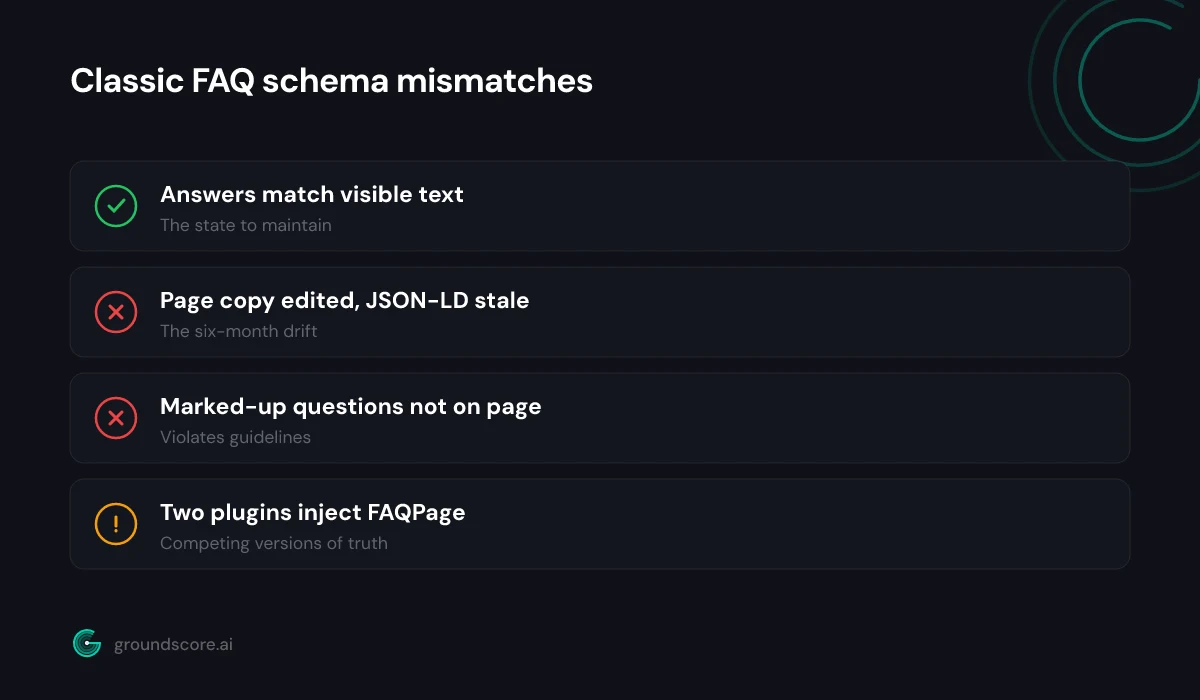
Mismatch is the quiet failure mode of FAQ schema. It rarely happens on day one. It happens six months later, when someone rewrites the FAQ copy in the CMS and nobody remembers the JSON-LD block exists. Now the page says one thing and the markup says another, and any system comparing the two has a reason to trust neither.
A few habits prevent this:
- One source of truth. If your CMS renders the FAQ from structured fields, generate the JSON-LD from those same fields. Hand-maintained duplicates drift.
- Same-edit rule. Any change to visible FAQ copy and its schema ships together, in the same commit or the same CMS save.
- Quarterly spot check. Read the rendered page next to the markup twice a year. Five minutes per page.
Watch for plugin double-injection too. Some themes and SEO plugins each add their own FAQPage block, leaving the page with two competing versions of the truth. One FAQPage object per page. If a plugin already outputs one, edit through the plugin instead of adding a second block by hand.
Step 5: Validate the markup and re-test after every edit
Direct answer: Run the page through the schema.org validator to catch syntax errors, then through Google's Rich Results Test to confirm the FAQPage is detected. Fix any missing fields, then reread the page and confirm every marked-up answer matches the rendered text exactly. Revalidate after every content edit.
Two free tools cover validation. The schema.org validator checks that your JSON-LD is syntactically valid and the types are real: a missing comma, a misspelled acceptedAnswer, or a stray field shows up here. The Rich Results Test confirms the page parses as a FAQPage from Google's perspective and flags required fields you missed.
Validate the live URL, not a copy of the code. Plenty of markup is correct in a text editor and broken in production because the CMS escaped a quote or a minifier mangled the block. The live page is the only version engines see.
The tools cannot catch the mismatch problem from step 4, because they read only the markup, not your intent. That check stays manual: markup on the left screen, rendered page on the right, read both. While you are at it, confirm AI crawlers can reach the page at all; a perfect FAQPage behind a robots.txt block helps nobody. Our guide to checking AI crawler access covers that audit in ten minutes.
If you manage more than a handful of pages, batch the checks: a plain spreadsheet with page URL, last validated date, and last copy edit date is unglamorous and works. The failure pattern is never one dramatically broken page; it is a slow accumulation of unvalidated edits across a site.
Then put the check on a calendar. Schema is not a set-and-forget asset; it is a promise that the markup matches the page, renewed every time the page changes.
Frequently asked questions
Does FAQ schema guarantee AI engines will cite my page?
No. FAQ schema removes a comprehension barrier; it does not create authority. Engines still weigh whether your site is credible, whether the answer is accurate, and whether other sources corroborate it. Treat the markup as packaging: it helps a good answer travel, but it cannot rescue a weak one.
How many questions should one page mark up?
Five to eight is a sensible range for most pages: enough to cover the real questions in one topic cluster, few enough that every answer stays specific. If you find yourself past ten, the page is probably serving two clusters and will do better split into two focused pages.
Do AI engines actually read JSON-LD?
AI systems that fetch web pages parse the HTML, and JSON-LD is part of that HTML. Structured data gives them unambiguous question-and-answer pairs instead of layout guesswork. It also feeds the search indexes that several engines ground their answers in, so the markup works through more than one door.
Should I use FAQPage or QAPage schema?
Use FAQPage when you wrote the page and each question has one official answer, which covers almost every business site. QAPage is for forums and community threads where multiple users submit competing answers. Marking an ordinary FAQ section up as QAPage misdescribes the content, and validators will flag the missing fields.
Can I put HTML or links inside the schema answers?
Keep the answer text as close to plain text as possible. Some parsers tolerate a few simple tags, but every layer of markup inside the JSON is another chance to drift from the visible page. If an answer genuinely needs a link, put the link in the visible copy.
What if a plugin already generates FAQ schema for me?
Plugins are fine, and often the most maintainable option, because they build the markup from the same fields that render the page. Your job shifts to verification: run the live URL through the validator, confirm exactly one FAQPage object exists, and re-check the output whenever the plugin updates. Trust it, then verify quarterly.
The bottom line
FAQ schema is a small job with a real payoff, but the payoff comes from the discipline around it: real buyer questions, standalone 40 to 60 word answers, markup that mirrors the page exactly, and validation that runs on every edit. The JSON-LD block itself is twenty minutes of work. The habit of keeping it honest is what separates markup that earns citations from markup that just sits there.
If you want to know whether AI engines can already see and use your pages, run a free AI visibility check and get your answer in about a minute.
How visible is your site in AI search?
Check your AI visibility score in seconds. Free, no account needed.
Check your score