8 Quick Wins to Improve Your AI Search Visibility Fast
By Joe Della Mora, Founder, GroundScore
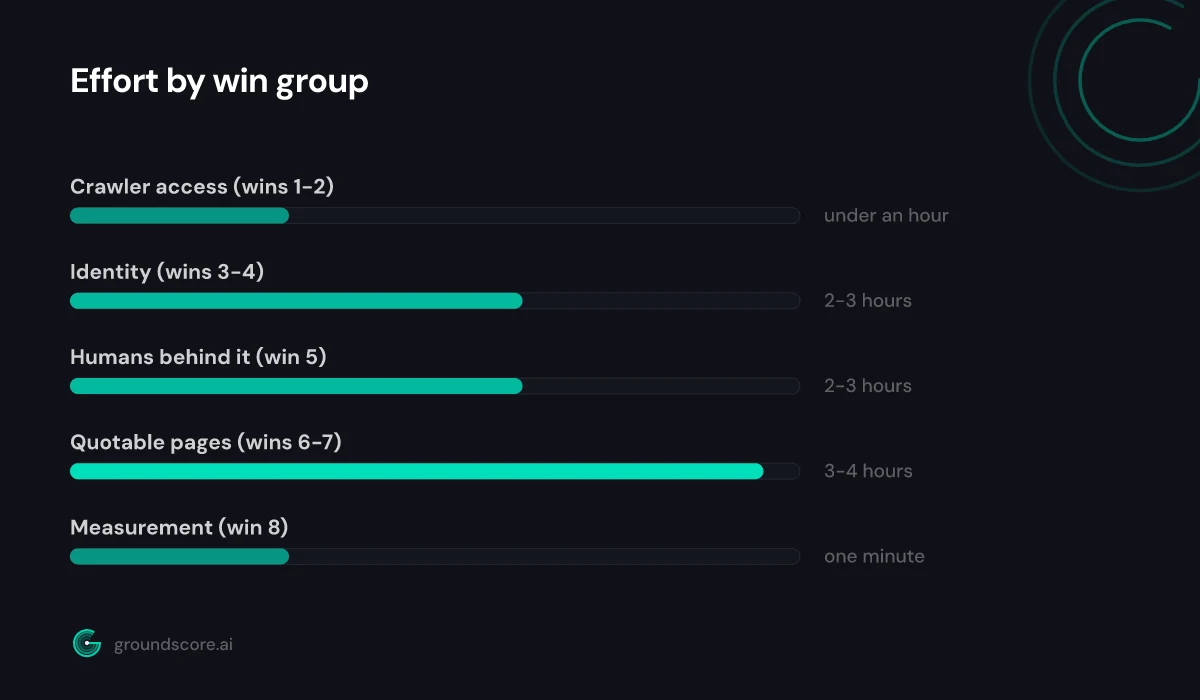
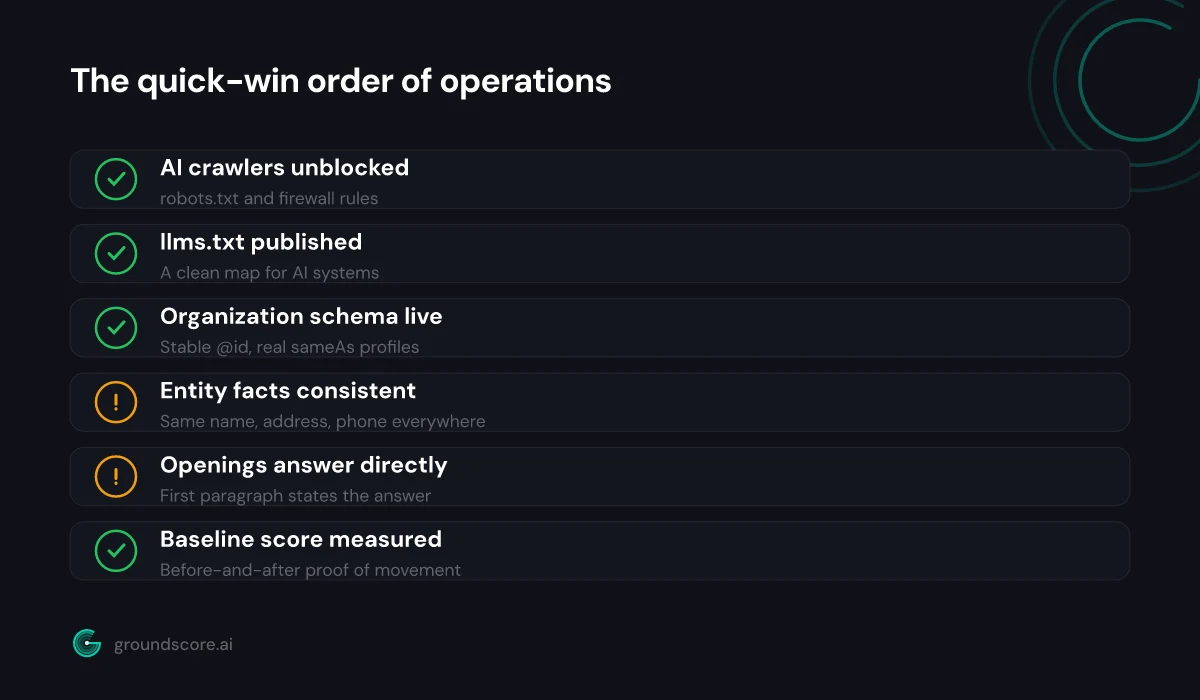
Most advice on how to improve AI search visibility reads like a research agenda: rebuild your content strategy, earn authority, wait. This list is the opposite — eight quick wins, each doable in an afternoon or less, each with an honest effort estimate and a note on what it actually fixes. None of them require new tooling or a developer on retainer, and they are ordered so the earlier wins make the later ones count: access first, then identity, then quotability, then measurement. That ordering is the part generic checklists miss — FAQ schema on a page AI crawlers cannot fetch is wasted work. Expect the full list to take one focused day spread across a week. Here are the eight, grouped into the four jobs they do.
Open the door for AI crawlers
Direct answer: The first two wins fix access, because nothing else on this list matters if AI systems cannot fetch your pages. Win 1 is unblocking AI crawlers in robots.txt and your firewall; win 2 is publishing an llms.txt file that hands engines a clean map of your site.
Win 1: Unblock AI crawlers. Effort: 15 to 30 minutes. Open yoursite.com/robots.txt and read every Disallow line. You are looking for two failure modes: a blanket block under User-agent: * that catches everyone, and specific blocks on AI agents — GPTBot, OAI-SearchBot, ClaudeBot, PerplexityBot, Google-Extended — added deliberately years ago and forgotten. When we run free checks at GroundScore, a forgotten robots.txt rule is the most common blocker we see, and the owner almost never knows it is there. Check your CDN or firewall's bot rules too; a WAF set to "block AI bots" overrides anything robots.txt says. What it fixes: total invisibility. A blocked crawler does not rank you lower — it never sees you at all.
Win 2: Publish llms.txt. Effort: 30 to 60 minutes. An llms.txt file is a markdown summary at your site root — who you are, what you do, and links to your most important pages — designed for AI systems that cannot afford to parse your whole site at answer time. The spec at llmstxt.org is short, adoption is still early and uneven, and that is exactly why it is cheap insurance: minutes of work for a file whose audience is growing. The free llms.txt generator builds one from your URL. What it fixes: engines guessing at what your site is about instead of being told.
Tell engines exactly who you are
Direct answer: Wins 3 and 4 give AI engines a consistent, machine-readable identity. Win 3 adds Organization schema so your business exists as an entity rather than a domain name; win 4 hunts down the inconsistent names, addresses, and phone numbers that quietly fragment that entity across the web.
Win 3: Add Organization schema. Effort: 30 to 60 minutes. One JSON-LD block in your site-wide template — name, url, logo, sameAs links to your real profiles — turns your business into an entity an engine can recognize and connect content to. Give it a stable @id so article and author markup can reference it. The full wiring, with copy-paste code for each block, is in the guide to Organization and Article schema for E-E-A-T. What it fixes: anonymous publishing. Content attributed to a real organization is easier to trust, and easier to cite, than content floating on a bare domain.
Win 4: Fix entity inconsistencies. Effort: one to two hours. Search for your business name, address, and phone number as they appear on your own site, your Google Business Profile, and your major directory listings. Every variation — old suite number, abbreviated name, a defunct phone line — is a small vote against you being one coherent entity. AI engines corroborate: when multiple sources agree on the facts of your business, confidence rises; when they conflict, the safest move is to cite someone else. Fix your own site first, then the profiles you control. What it fixes: engines hedging on who you are.
Show the humans behind the site
Direct answer: Win 5 is publishing a real about page and author bios. AI engines weigh whether content traces back to identifiable people with relevant experience, and most small-business sites offer nothing to trace — no names, no credentials, no page that says who is behind the advice.
Win 5: Add an about page and author bios. Effort: two to three hours, mostly writing. The about page should state plainly who runs the business, what qualifies you, how long you have been at it, and where you operate. Not marketing copy — facts. If you publish articles, add a short bio to each author with a real name and a real title, and give the bio a permanent home the byline can link to.
This is the win people skip because it feels soft compared to schema and robots.txt. It is not. Retrieval systems assessing a passage about, say, water heater maintenance can weigh whether the source connects that advice to a licensed plumber or to nobody. The about page is where that connection becomes checkable — and it is also where the Person markup from win 3's companion guide gets its anchor, which is why this win sits after the schema work.
Two details worth the extra ten minutes. First, name a specific person, even if — especially if — the business is one person. "Our team of experts" is an anti-signal; "Jane Doe, master plumber, licensed since 2009" is a fact an engine can corroborate elsewhere. Second, link the about page from your main navigation or footer, not just the sitemap. A page describing who you are, reachable from every page you publish, is structural honesty. What it fixes: content with no accountable human behind it, which is precisely the content engines have learned to be cautious about.
Make your pages quotable
Direct answer: Wins 6 and 7 reshape your content so an engine can lift an answer straight out of it. Win 6 adds FAQ schema to your highest-traffic pages; win 7 rewrites page openings so the first paragraph answers the question the page exists to address.
Win 6: Add FAQ schema to your top pages. Effort: one to two hours for your three most important pages. Pick questions customers genuinely ask, write answers of a few sentences that stand alone without surrounding context, put them visibly on the page, and mark the pairs up with FAQPage JSON-LD that matches the visible text exactly. The step-by-step, including the classic mismatch mistakes, is in how to add FAQ schema AI engines can use. What it fixes: good answers buried in prose an engine will not excavate.
Win 7: Rewrite your page openings as direct answers. Effort: 30 minutes per page. Most service pages open with a slogan; most blog posts open with throat-clearing. An engine looking for a citable passage wants the opposite — a first paragraph that states the answer outright, then earns it. Take your five most important pages and rewrite each opening so someone reading only the first three sentences learns the essential fact the page exists to deliver. This is also simply better writing for humans in a hurry. What it fixes: pages that are about an answer without ever stating one.
Measure so you know what moved
Direct answer: Win 8 is getting your AI visibility measured before and after the other seven. Without a baseline you are guessing whether any of this worked; with one, you can see which fixes moved your score and where the remaining gaps are, and stop spending effort on solved problems.
Win 8: Get your score measured. Effort: about a minute for a free AI visibility check, no account needed. The check scores your site from 0 to 100 across three pillars — Authority & Trust, Site Readiness, AI Presence — and shows what is holding each one down.
Here is the full list with the effort math in one place:
| # | Quick win | Effort | What it fixes |
|---|---|---|---|
| 1 | Unblock AI crawlers | 15-30 min | Total invisibility to engines |
| 2 | Publish llms.txt | 30-60 min | Engines guessing what you are |
| 3 | Add Organization schema | 30-60 min | Anonymous publishing |
| 4 | Fix entity inconsistencies | 1-2 hours | Conflicting business facts |
| 5 | About page and author bios | 2-3 hours | No accountable human |
| 6 | FAQ schema on top pages | 1-2 hours | Answers buried in prose |
| 7 | Direct-answer openings | 30 min per page | Pages that never answer |
| 8 | Measure your score | 1 minute | Guessing at what moved |
Run it twice: once before you touch anything, once after the fixes have had time to be recrawled. The before-run does something subtle and useful — it reorders this list for your site. If your access is already clean, wins 1 and 2 are confirmation rather than work, and your afternoon belongs to schema and content. If your Site Readiness pillar is weak, you now know the boring infrastructure fixes come first no matter how tempting the content rewrites look.
The after-run is where quick wins either compound or stall. A score that moved tells you the effort landed and which pillar to push next. A score that did not move usually means one of two things: the crawlers have not been back yet — give it time — or a blocker upstream of your fix is still in place, which is most often the win 1 access problem resurfacing through a CDN rule nobody checked. Either way, you are debugging with data instead of vibes.
One-off measurement is enough for this list. Whether ongoing monitoring earns its cost depends on how often your market and your competitors move — a question that deserves its own post.
Frequently asked questions
How fast will these quick wins actually show results?
Fixes take effect when AI crawlers next fetch your pages, which ranges from days to a few weeks depending on your site. Access fixes tend to show first, since they unblock everything downstream. Measure before you start and again after two to four weeks, and judge by the score movement rather than the calendar.
Which quick win matters most if I only do one?
Unblock AI crawlers. Every other improvement assumes engines can fetch your pages; a robots.txt or firewall block makes the rest cosmetic. It is also the fastest item on the list — fifteen minutes to check, usually one line to fix — which makes it the best effort-to-impact ratio here by a wide margin.
Do I need a developer to do any of this?
Mostly no. Robots.txt edits, llms.txt, about pages, and rewritten openings are copy-and-text work. Organization and FAQ schema are paste-in JSON-LD blocks most CMS platforms accept through a plugin or theme setting. A developer helps if your firewall rules live in code or your templates are locked down, but none of it requires one by default.
Will these fixes hurt my regular Google SEO?
No. Every win here is either neutral or positive for traditional search. Schema markup, consistent business data, real author pages, and direct-answer openings are established SEO practice; llms.txt is ignored by systems that do not read it. Nothing on this list trades Google visibility for AI visibility — the signals overlap far more than they conflict.
How do I know if AI engines are already citing my site?
Ask them what your customers ask — a handful of buyer questions in ChatGPT or Perplexity — and note whether your site appears in the answers or sources. That is a spot check: useful, but answers vary run to run. A measured check covers more questions consistently and gives you a tracked baseline instead of an anecdote.
The bottom line
Eight wins, four jobs: open the door (unblock crawlers, publish llms.txt), prove who you are (Organization schema, consistent entity data), show the humans (about page and bios), make pages quotable (FAQ schema, direct-answer openings), and measure the difference. None of them are clever. All of them are the kind of work most sites have simply never done, which is why they move the needle fast.
Start with the baseline so you know which wins your site actually needs: run a free AI visibility check — it takes about a minute, no account required.
How visible is your site in AI search?
Check your AI visibility score in seconds. Free, no account needed.
Check your score