GPTBot, ClaudeBot, PerplexityBot: AI Crawlers Explained
By Joe Della Mora, Founder, GroundScore
AI crawlers are the machines deciding whether your website exists to ChatGPT, Claude, and Perplexity — and most robots.txt decisions about them are made without knowing what each crawler actually does. That is how sites end up blocking their own AI search visibility while trying to opt out of model training, or the reverse. The confusion is understandable: OpenAI alone runs three different agents with three different jobs. This guide sorts the seven names you will actually encounter — GPTBot, OAI-SearchBot, ChatGPT-User, ClaudeBot, Claude-User, PerplexityBot, and Google-Extended — by the only distinction that matters: what each visit feeds, and therefore what blocking it costs. We will cover why there are three kinds of crawler, walk through each company's agents, and finish with a plain accounting of the cost of blocking each one.
Why are there three kinds of AI crawler?
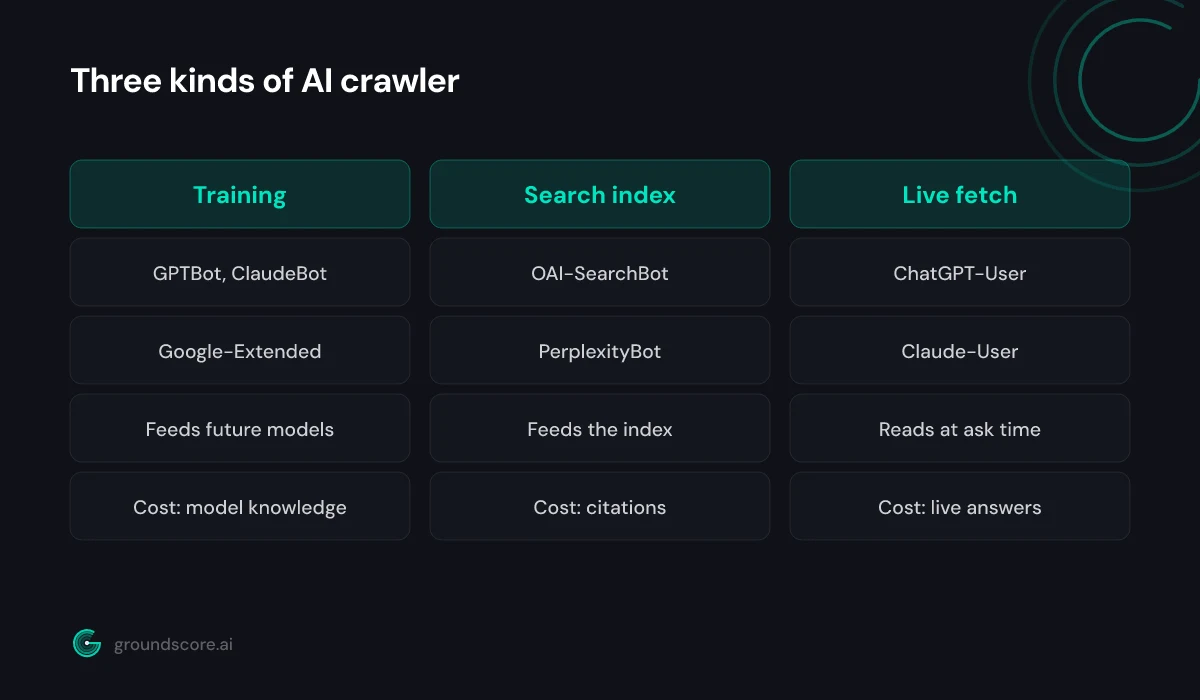
Direct answer: AI crawlers fall into three types. Training crawlers collect content to teach future models. Search or grounding crawlers build the index an AI engine retrieves from when answering. User-triggered fetchers visit a page live because a person's question requires it. Each type visits for a different reason, and blocking each has a different cost.
The three types map to the three ways your content can reach an AI engine's user. Training crawlers feed the model itself: pages they collect become part of what a future model knows, in a slow, diffuse way — your content shapes its understanding of your industry and your business long before anyone asks a question. Search and grounding crawlers feed an index, the same architecture as classic search: when a user asks something, the engine retrieves candidate pages from that index and cites the ones it uses. User-triggered fetchers skip the index entirely — the engine fetches your page at the moment a specific conversation needs it, reads it live, and grounds its answer in what it finds.
The distinction matters because robots.txt treats every agent identically — a name and a rule — while the consequences differ enormously. Blocking a training crawler is a policy decision about your content and future models. Blocking a search crawler or a live fetcher is a distribution decision: it removes you from answers being generated for real users today. Sites that blocked every agent with "AI" in the name made one decision when they thought they were making the other. Every agent below fits one of these three types, which is why the type — not the brand — should drive your policy.
What are OpenAI's three crawlers?
Direct answer: OpenAI runs three crawlers: GPTBot gathers content for model training, OAI-SearchBot indexes the web for ChatGPT's search results, and ChatGPT-User fetches pages live when a user's conversation calls for them. Blocking GPTBot alone does not remove you from ChatGPT search — those visibility paths run through the other two.
OpenAI is where the type distinction earns its keep, because the three agents are routinely confused with each other.
GPTBot is the training crawler and the name everyone knows. It crawls the web collecting content used to train OpenAI's models. Blocking it is the standard way to opt out of that training — and during the great robots.txt panic, thousands of sites did exactly that, many believing they were "blocking ChatGPT."
OAI-SearchBot is the search indexer. It builds and maintains the index behind ChatGPT's search functionality — the mode where ChatGPT answers with linked citations to current web sources. If OAI-SearchBot cannot crawl you, you are not in that index, and ChatGPT search cannot cite what it cannot retrieve.
ChatGPT-User is the live fetcher. When a user's conversation needs a specific page — they pasted your URL, or the model decides your page answers their question — this agent fetches it in real time on that user's behalf.
The practical takeaway: these are three separate robots.txt decisions, and OpenAI publishes documentation for each agent, including IP ranges for verification, at platform.openai.com/docs/bots. A site can block GPTBot to stay out of training data while explicitly allowing OAI-SearchBot and ChatGPT-User to stay visible in ChatGPT's answers. Blanket-blocking all three because of the first one is the single most common self-inflicted visibility wound we see.
What do ClaudeBot and Claude-User do?
Direct answer: Anthropic runs two agents you will see in logs: ClaudeBot, which crawls the web to collect content for training Claude models, and Claude-User, which fetches a page in real time when a Claude user's request needs it — for example when Claude searches the web and reads your site to ground an answer.
Anthropic's lineup is simpler than OpenAI's — two agents, two types.
ClaudeBot is the training crawler, Anthropic's counterpart to GPTBot. It gathers web content used in training Claude models. Blocking it in robots.txt opts your content out of that collection, with the same trade-off as any training block: future models learn less about your business from the source that describes it best — you.
Claude-User is the live fetcher, and for visibility it is the one to watch. When someone using Claude asks a question that sends Claude to the web — or shares a link they want analyzed — Claude-User is the agent that shows up in your logs to retrieve the page. If it gets a 403 from your firewall, Claude tells its user it could not access the page, and whatever answer follows gets built from other people's sites.
When we run free checks at GroundScore, Claude-User blocks are the quiet ones: site owners who deliberately blocked ClaudeBot during the training debates rarely realize a separate Anthropic agent exists, and CDN bot rules frequently sweep up both names with one pattern match. The result is a site that opted out of training — a defensible choice — and accidentally opted out of being readable in live Claude conversations, which is pure distribution loss. Check the two names separately in your robots.txt, and separately again in your firewall rules; they are different decisions with different costs.
What about PerplexityBot and Google-Extended?
Direct answer: PerplexityBot indexes the web for Perplexity, an engine that cites sources on every answer, so blocking it removes you from those citations. Google-Extended is different: it is not a crawler you will see but a robots.txt control that tells Google not to use your content for AI model training.
PerplexityBot is a search-type crawler and, citation for citation, one of the most consequential. Perplexity's entire product is answers with numbered source citations — every response links the pages it drew from. That makes it the clearest illustration of what search-crawler access buys: if PerplexityBot can index your pages, you are a candidate for those citation slots; if it cannot, you are not in the pool at all. For businesses whose buyers research on Perplexity, this one robots.txt line is the difference between being a cited source and not existing.
Google-Extended is the oddball on the list, and worth understanding precisely. It is not an agent that visits your site — regular Googlebot does the fetching, as it always has. Google-Extended is a robots.txt token: disallowing it tells Google not to use your content for training its AI models. Two things it does not do: it does not affect your normal Google search indexing or rankings, and it does not remove you from Google's search-based AI features, which work from the standard index. So blocking Google-Extended is a relatively contained training opt-out — while blocking Googlebot itself, in a misguided attempt to block "Google's AI," takes your site out of Google entirely. Do not confuse the two.
Between them, these two names capture the whole spectrum: one is pure distribution, the other pure training policy.
What does blocking each crawler actually cost you?
Direct answer: The cost depends on the crawler's job. Blocking training crawlers (GPTBot, ClaudeBot, Google-Extended) limits how future models learn about you. Blocking search and user-triggered agents (OAI-SearchBot, ChatGPT-User, Claude-User, PerplexityBot) is immediate: your pages drop out of the live answers those engines give users today.
Here is the full accounting in one table:
| User agent | Operator | Type | If you block it |
|---|---|---|---|
| GPTBot | OpenAI | Training | Future OpenAI models learn less about you |
| OAI-SearchBot | OpenAI | Search index | You drop out of ChatGPT search citations |
| ChatGPT-User | OpenAI | Live fetch | ChatGPT cannot read your pages for users |
| ClaudeBot | Anthropic | Training | Future Claude models learn less about you |
| Claude-User | Anthropic | Live fetch | Claude cannot read your pages for users |
| PerplexityBot | Perplexity | Search index | You leave Perplexity's citation pool |
| Google-Extended | Training control | Google stops using your content for AI training |
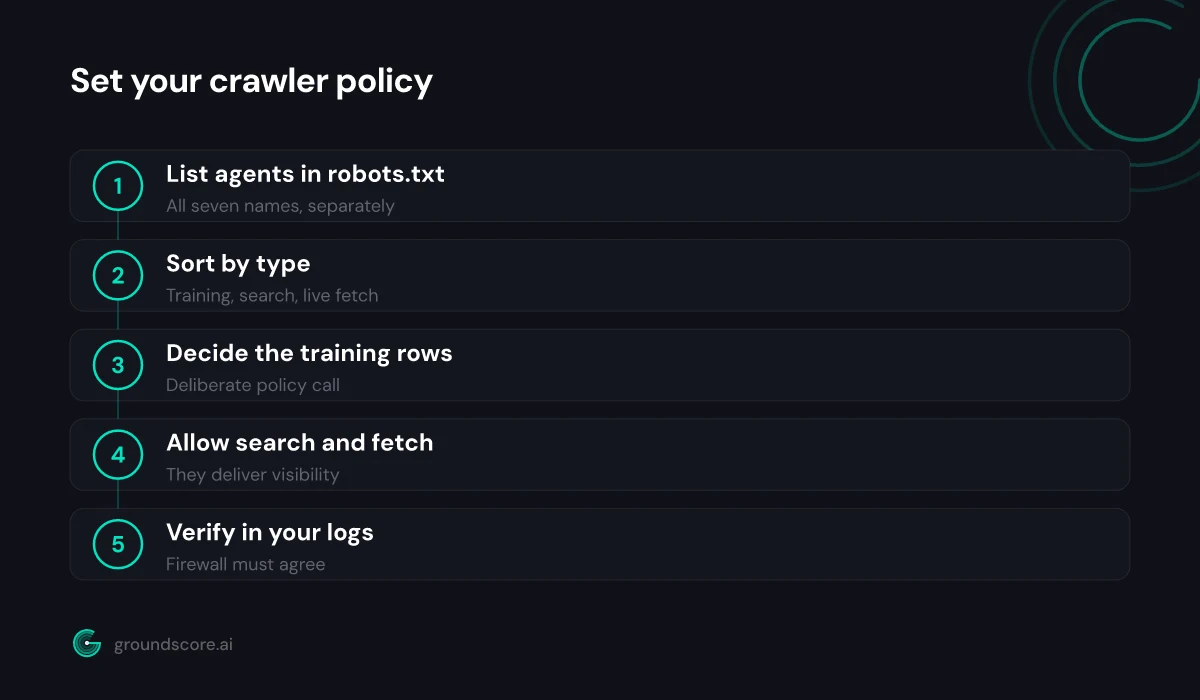
For most businesses trying to be found, the sensible default falls out of the table directly: allow everything in the search-index and live-fetch rows, because those agents are the delivery mechanism for AI search visibility, and their absence costs you named citations in front of buyers now. The training rows are a real decision with arguments on both sides — content control versus being well understood by the models people ask — and reasonable businesses land differently. What is not sensible is deciding by accident: one regex in a CDN rule, or one copied robots.txt template, treating seven different jobs as one.
Whatever policy you choose, verify it is actually what your infrastructure enforces — robots.txt and firewall rules drift apart over time. The crawler access audit covers testing every agent on this list end to end.
Frequently asked questions
Should I block AI training crawlers?
It is a legitimate business choice, not a technical error either way. Blocking GPTBot, ClaudeBot, and Google-Extended keeps your content out of future training runs; allowing them means models learn about your business from your own pages. Just decide it deliberately, and keep search and live-fetch agents out of the blast radius.
Does allowing these crawlers slow down my website?
Not meaningfully for most sites. These agents fetch pages the way any crawler does, and well-behaved ones respect crawl-delay conventions. If a crawler ever hits you abusively, rate-limit or block that specific agent based on evidence from your logs — rather than pre-blocking the whole category and losing the visibility.
How do I verify a crawler is really who it claims to be?
User-agent strings can be spoofed by anyone. The operators publish verification methods — OpenAI, for example, documents the IP ranges its agents crawl from. For everyday access auditing, spoofing rarely matters; verify IPs when you see suspicious volume or need to be certain before firewalling a name.
Where do I see which AI crawlers visit my site?
Your server or CDN access logs. Filter requests by user agent and search for the seven names in this guide. Presence with 200 status codes means healthy access; presence with 403s or 429s means something in your stack is blocking agents your robots.txt may well allow.
Are there other AI crawlers besides these seven?
Yes — new agents appear as products launch, and Microsoft, Meta, Apple, and others operate their own. The seven here cover the engines most buyers actually use today. More usefully, the three-type framework transfers: identify whether a new agent feeds training, an index, or live answers, and the cost of blocking it follows.
The bottom line
Seven names, three jobs. GPTBot, ClaudeBot, and Google-Extended are training policy; OAI-SearchBot and PerplexityBot are search indexes; ChatGPT-User and Claude-User are live readers acting for real users mid-question. Blocking the first group is a philosophical choice about your content. Blocking the second and third is turning away customers you never see. Set each rule on purpose, and check that your firewall agrees with your robots.txt.
To find out in about a minute whether all of these crawlers can actually reach your site — no account needed — run a free AI visibility check.
How visible is your site in AI search?
Check your AI visibility score in seconds. Free, no account needed.
Check your score