How to Create an llms.txt File for Your Website Today
By Joe Della Mora, Founder, GroundScore

You can create an llms.txt file in under an hour, and this guide walks through every step. Prerequisites are light: a plain text editor, a list of your website's pages, and access to wherever your site's files live — a hosting file manager, a CMS plugin, or a developer who can push one file. Difficulty is low; the work is editorial judgment, not code.
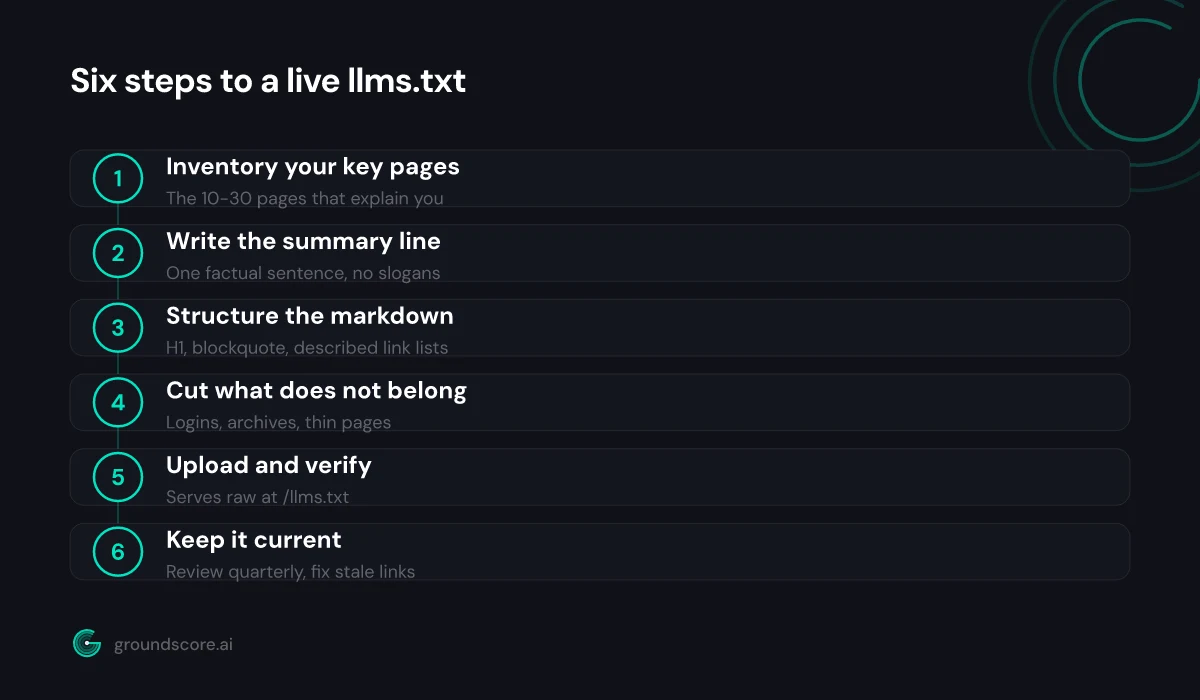
If you want the background first, our llms.txt explainer covers what the file is and where adoption stands. And if you want the fast path, GroundScore's free llms.txt generator drafts the file from your site in minutes — this guide still matters, because you should review anything a generator produces. Here are the six steps: inventory, summary, structure, cuts, upload, upkeep.
Step 1: Inventory your key pages
Direct answer: Start by listing the 10 to 30 pages that best explain who you are and what you offer: your homepage, core service pages, pricing, about page, and your strongest guides. llms.txt is a curated index, not a site dump — if a page would not help an AI describe your business, leave it off.
Open a blank document and work through your site the way a stranger would. What would someone need to read to describe your business accurately? For most businesses the list assembles itself: the homepage, each core service or product page, pricing, the about page, contact or service-area information, and a handful of genuinely useful guides or FAQ pages.
Resist completeness. Your sitemap already lists everything; this file exists to apply judgment. A good filter question for each candidate page: if an AI system read only this page, would it understand something true and useful about us? Blog posts pass that test occasionally. Tag archives never do.
While you build the list, note a one-line answer to "what does this page cover?" for each entry. You will need those lines in Step 3, and writing them now exposes weak candidates — if you cannot say what a page covers in one clause, it probably does not belong in the file.
Sort the final list roughly by importance, most essential first. Order carries signal in a file designed to be read top to bottom by systems that may stop early.
Step 2: Write your one-line summary
Direct answer: Below the file's H1, llms.txt uses a markdown blockquote for a one-paragraph summary of your site. Write one plain sentence that says who you are, what you do, and who you serve. No slogans, no superlatives — a language model will repeat this line back to users, so make it factual.
This is the highest-leverage sentence in the file, and most first drafts get it wrong in the same way: they write marketing copy. "The leading solution for modern teams" tells a language model nothing it can use. Compare: "Ridgeline Bookkeeping provides monthly bookkeeping and tax preparation for restaurants in the Denver metro area." Every word of that is a usable fact — name, services, customer type, geography.
The test is simple: imagine an AI assistant answering "what is this company?" using only your summary line. If the answer would sound specific and true, the line works. If it would sound like a billboard, rewrite it.
Keep it to one or two sentences. Name the business, state the category, name the audience or area you serve, and stop. You can add a short paragraph of extra context after the blockquote if something genuinely needs explaining — an unusual business model, a critical distinction — but most sites should not need it.
Write the line now, in your draft document, before touching structure. Everything else in the file is scaffolding around this sentence.
Step 3: Structure the markdown
Direct answer: An llms.txt file follows a fixed shape: an H1 with your site name, a blockquote summary, optional context paragraphs, then H2 sections containing bulleted links, each with a short description. Group links by theme — services, guides, company — and keep every description to one clause that says what the page covers.
The format comes from the spec at llmstxt.org, and it is deliberately minimal. Assemble your Step 1 inventory and Step 2 summary into this skeleton:
  # Your Business Name
  > One factual sentence about who you are, what you do,
  > and who you serve.

  ## Services
  - Service page title: https://yourdomain.example/service-a
  - Another service: https://yourdomain.example/service-b

  ## Guides
  - Guide title: https://yourdomain.example/guide

  ## Company
  - About us: https://yourdomain.example/about

  ## Optional
  - Blog: https://yourdomain.example/blog
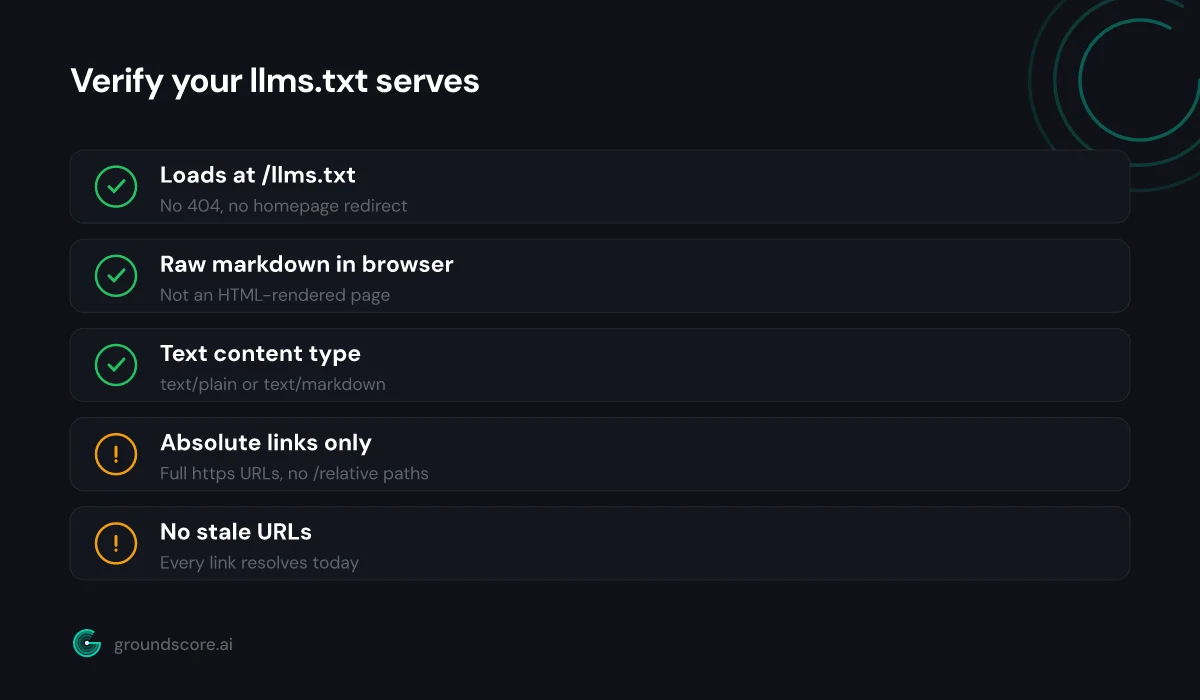
Three formatting rules matter. First, use absolute URLs — the file is read out of context, so a relative link like /pricing is useless to the system reading it. Second, write each bullet as a standard markdown link — the page title in square brackets, the URL in parentheses — followed by a colon and your one-line description; the skeleton above shows the shape schematically, and the spec shows the exact link syntax. That one-link-one-description pattern is what parsers built for the spec expect. Third, reserve the section named "Optional" for genuinely skippable links — the spec gives that heading special meaning, letting systems drop those links when context is tight.
Section names beyond "Optional" are yours to choose. Group by how a buyer thinks: services, products, pricing, guides, company.
Step 4: Decide what to leave out
Direct answer: Exclude anything that would waste an AI system's limited reading budget: login pages, cart and checkout flows, tag archives, thin location doorways, legal boilerplate, and duplicate content. If a page is low-value or half-finished, listing it actively hurts — you are telling AI systems it represents your best work. Curate ruthlessly.
The cuts are where the file earns its value, so it is worth being explicit about both sides of the line:
| Include | Leave out |
|---|---|
| Homepage and core service pages | Login, account, and checkout pages |
| Pricing and plans | Cart, thank-you, and confirmation pages |
| About, team, and contact pages | Tag and date archive pages |
| Your best guides and FAQs | Thin doorway pages and near-duplicates |
| Proof pages: credentials, reviews | Privacy policy and legal boilerplate |
| Key product or category pages | Drafts, outdated posts, dead campaigns |
Two cuts deserve special mention because people resist them. The first is old blog content. If a post is thin, outdated, or embarrassing, it does not belong in the file even though it technically exists — the file frames whatever it lists as representative. The second is exhaustive product listings. An e-commerce site with four hundred products should list its main category pages, not every SKU; the categories give an AI the shape of the catalog without drowning it.
There is also a privacy-shaped consideration: the file is public, like robots.txt. Do not list anything you would not want highlighted, and remember that leaving a page out of llms.txt does not hide it — exclusion here is curation, not access control.
Step 5: Upload it and verify it serves
Direct answer: Save the file as llms.txt and upload it to your site's root so it loads at yourdomain.com/llms.txt. Then verify: open the URL in a browser, confirm you see raw markdown rather than a 404 or an HTML page, and check the response serves as a text content type.
How you upload depends on your platform. On traditional hosting, drop the file into the web root directory alongside robots.txt. On WordPress, a file manager plugin or your host's control panel does it; several SEO plugins now write the file for you. On site builders and headless setups, look for a static-files or public-directory option — anywhere you could serve a robots.txt, you can serve this.
Then verify, because uploads fail quietly. Open yourdomain.com/llms.txt in a private browser window and check three things. One: the file loads — not a 404, not a redirect to your homepage. Two: you see your markdown as written, not an HTML-styled rendering of it. Three: the response content type is text — text/plain or text/markdown both work. You can see the content type in your browser's developer tools under the network tab, or by fetching the URL with a command-line tool.
The most common failure we see is the platform intercepting the path: a catch-all route swallowing the URL and returning the homepage or a styled error page with a 200 status. It looks fine at a glance and serves nothing useful. If that happens, your platform needs the path registered as a static file — usually a one-line configuration fix.
Step 6: Keep it current
Direct answer: An llms.txt file is only useful while it is accurate. Review it whenever you add or retire a key page, and put a quarterly reminder on the calendar as a backstop. Stale links and outdated descriptions misdirect the exact systems you created the file to help, which is worse than having no file.
Building GroundScore, the pattern I keep seeing when we scan sites that do have an llms.txt is staleness: the file was generated once, the site moved on, and now it points at renamed services and dead URLs. That is worse than absence — you are actively handing AI systems wrong directions with your name on them.
Make upkeep boring and it will happen. Add "update llms.txt" to whatever checklist you already run when launching or retiring a page. Set a quarterly calendar reminder to read the file top to bottom and click every link. If your platform can regenerate the file automatically from your site structure, use that — but still do the quarterly read, because automation preserves whatever curation decisions you made months ago, right or wrong.
The review itself takes ten minutes. Does the summary line still describe the business? Does every link resolve? Does the set of pages still reflect what you would want an AI system to read first? Fix what fails, re-upload, re-verify.
That is the whole discipline. A current, curated llms.txt quietly outperforms the neglected ones that make up most of the files in the wild — and as we covered in llms.txt vs robots.txt vs sitemap.xml, it only takes this one file to complete the permission-discovery-comprehension trio.
Frequently asked questions
Do I need a developer to create an llms.txt file?
No. It is a plain text file you can write in any editor — no code, no build step. The only technical moment is uploading it to your site's root, which most platforms handle through a file manager or plugin. If you can publish a robots.txt, you can publish this.
What content type should llms.txt serve?
Plain text or markdown — text/plain or text/markdown both work. What matters is that the URL returns the raw file, not an HTML-rendered version, a redirect to your homepage, or a styled 404 page. Open it in a browser: if you see your markdown as written, you are fine.
Should the links in llms.txt be absolute or relative?
Absolute, always — full URLs including your domain. The file gets read outside the context of your website, by systems that may fetch it in isolation, so a relative link gives a model nothing it can act on. Write every link as a complete https address.
Can I generate llms.txt automatically?
Yes. Several CMS plugins and standalone tools build the file from your site structure, including GroundScore's free generator. Automation is a good starting point, but review the output by hand: a generator cannot know which pages genuinely represent your business, and curation is the file's entire value.
Does llms.txt need to list every page on my site?
No — the opposite. llms.txt works because it is selective. Your sitemap already lists everything; this file exists to say which pages matter most and why. A focused file of ten to thirty described links serves an AI system far better than a dump of every URL you have.
How do I know if AI systems are fetching my file?
Check your server logs for requests to /llms.txt and look at the user agents making them. Given how early adoption is, expect modest traffic at first — treat the file as groundwork rather than a channel you measure weekly. Fetches trending upward over months is the realistic signal.
The bottom line
Creating an llms.txt file is an hour of honest editorial work: choose the pages that represent you, describe them plainly, publish the file where machines expect it, and keep it true as your site changes. No single file makes you visible in AI search, but this one is cheap, safe, and squarely in the practice-what-you-preach category — you are literally writing the guided tour you want AI systems to take.
Once it is live, see how the rest of your AI readiness stacks up with a free AI visibility check — it covers crawler access, structured data, and how you show up in real AI answers, in about a minute.
How visible is your site in AI search?
Check your AI visibility score in seconds. Free, no account needed.
Check your score